
Monitor your FTTH network in one place.
Live OLT/ONU status on map, FTTH route mapping, RX power (live + history), and network topology (coupler/splitter) — so operators find faults faster and owners get full visibility.
- ✓ See ONUs live (Online/Offline/Power off/Wire down)
- ✓ View customer routes on FTTH map
- ✓ Track RX now + historical trend
- ✓ Understand coupler/splitter topology
What ISP Saviour does
These are the exact FTTH operations modules operators use daily.
Live FTTH Network Monitoring
Operators should not keep logging into multiple OLT pages. ISP Saviour brings the live view into one place.
Live ONU status
See which ONUs are online/offline and the reason (Power off / Wire down) clearly.
Map + status together
Not just a table — location matters. Operators can visually understand where the issue is happening.
Faster first response
When customers call, operators can answer with clarity and guide technicians faster.
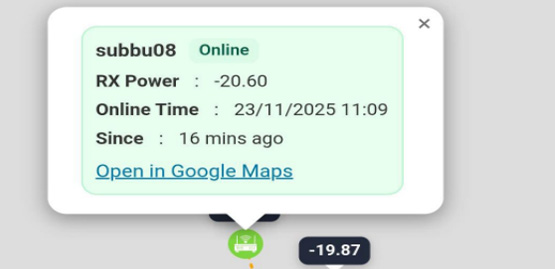
Live Monitoring on Map
Operators can instantly see ONU status with location context — so faults and clusters become obvious.
Fiber Route & FTTH Mapping
When the network is visible on map, troubleshooting becomes practical instead of guesswork.
Route visibility
See customer fiber routes and network paths clearly — useful for both operator and field team.
Landmarks & context
Poles, joint boxes, and key points can be used to make paths understandable on ground.
Remote-friendly
Owners managing remotely still get operational visibility without depending on calls and memory.
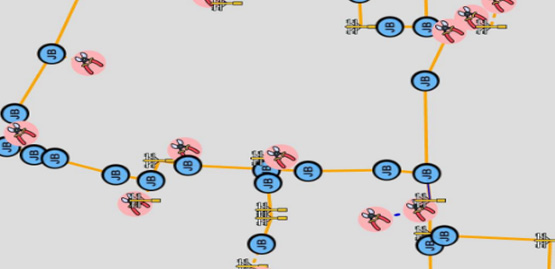
Fiber Route View
When routes and landmarks are visible, operators and field teams speak the same language and reach faster.
RX Power Monitoring & History
RX power is the early warning signal in FTTH. Tracking it over time helps reduce repeat complaints and hidden fiber issues.
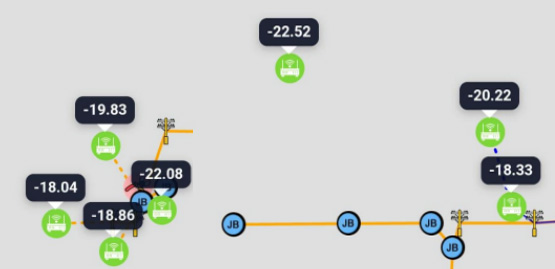
RX live display
Operators can view real-time RX power of ONUs directly in map and device views.
Trend history (database)
Store RX power history (example: 2 slots/day) so you can detect slow degradation and patterns.
Proof-based troubleshooting
Instead of arguments, you can show data: “RX changed over time” and act on facts.
RX Power (Live + History)
RX history helps you detect slow degradation and repeated issues — not just “today’s” snapshot.
Network Topology (Coupler / Splitter)
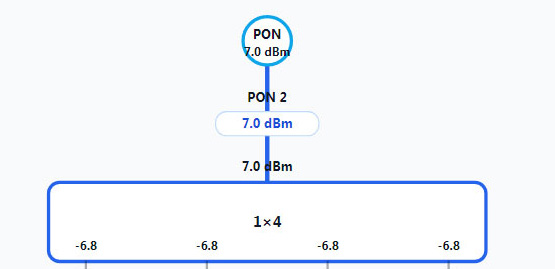
Understand how ONUs are connected through couplers and splitters — and compare estimated vs real power.
Topology view
View PON → couplers/splitters → ONUs as a clear structure (map + tree options).
Estimate vs real
See the difference between expected power and real RX — helps spot bad joints, bends, or wrong splits.
Training & consistency
New operators learn faster because the network is documented in a way they can understand.
Coupler / Splitter Topology
Understand the real connection path and compare estimated vs real power — this reduces confusion and improves training.
How it works (simple)
Operators should understand the workflow in 3 steps.
Why ISPs use ISP Saviour
Because it reduces operational confusion and saves time during faults and RX complaints.
Less downtime
Faster diagnosis means faster restoration and fewer repeat calls.
Less dependency
Network knowledge becomes visible, not trapped inside one person’s head.
More confidence
Owners and operators speak with proof, not assumptions — better customer communication.
Request a walkthrough
If you want to see how ISP Saviour fits your network, message us. We’ll discuss your operational pain points and show the tool with your workflow in mind.
- ✓ New ISP owners (inherited networks)
- ✓ Growing ISPs with RX complaints
- ✓ ISPs needing map + topology clarity
- ✓ Remote / work-from-home owners